2017-04-19-javaScript(DOM)
Xplorist Lv6

2017-04-19-javaScript(DOM)

知识点1:

学习方法论:

实例1:

遍历一个HTML网页的DOM文档对象模型的结构树

【多练几遍】

思路:

通过递归来遍历结构树,通过全局变量来存储遍历的节点的名称,并将节点的个数通过返回值返回到调用处,最后将节点名称和节点个数通过警告弹窗将信息展示出来。

核心代码:

1
2
3
4
5
6
7
8
9
10
11
12
13
14
15
16
17
18
19
20
21
22
23
24
25
26
27
28
29
30
31
32
33
<!DOCTYPE html>

<html>
    <head>
        <title>js获取DOM</title>
    </head>
    <body onload="show()">
        遍历HTML网页中的所有元素节点</br>
        <a href="https://www.baidu.com">百度</a>
    </body>
    <script type="text/javascript">
        var elementList="";
        function getElement(node){
            var total=0;
            if(node.nodeType==1){
                total++;
                elementList=elementList+node.nodeName+",";
            }
            var childrens=node.childNodes;
            for(var m=node.firstChild;m!=null;m=m.nextSibling){
                total+=getElement(m);
            }
            return total;
        }
        function show(){
            var number=getElement(document);
            elementList=elementList.substring(0,elementList.length-1);
            alert("该文档中包含:"+elementList+"等"+number+"个标记!");
            elementList="";
        }
    </script>
    
</html>

实例2:

动态生成和删除有序列表的元素

【多练几遍】

思路:

通过document获取标签对象来进行操作

添加直接添加就行了

删除则直接删除最后一个就行了,

为了防止删除最后的两个元素怎有三种思路:

1.设置大于5

2.设置标志

3.设置id

核心代码:

1
2
3
4
5
6
7
8
9
10
11
12
13
14
15
16
17
18
19
20
21
22
23
24
25
26
27
28
29
30
31
32
33
34
35
36
37
38
39
40
41
42
43
44
45
46
47
48
49
50
51
52
53
54
55
56
<!DOCTYPE html>

<html>
    <head>
        <title></title>
    </head>
    <body>
        <div>
            <ol id="orderList">
                <li>张三</li>
                <li>李四</li>
            </ol>
        </div>
        <div>
            <input type="text" id="text" />
            <input type="button" id="bt" onclick="add()" value="添加" />
            <input type="button" id="bt1" onclick="rem()" value="删除" />
        </div>
        
    </body>
    <script type="text/javascript">
            var list=document.getElementById("orderList");
            var text=document.getElementById("text");
            var bt=document.getElementById("bt");
            var i=0;
        function add(){
            i=i+1;
            var child=document.createElement("li");
            var txt=document.createTextNode(text.value);
            child.appendChild(txt);
            list.appendChild(child);
            text.value="";
        }
        
        function dele(){
            var child=list.lastChild;
            list.removeChild(child);
        }
        
        function remo(){
            var children=list.childNodes;
            var childNum=children.length;
            var child=list.lastChild;
            if(childNum>5){
                list.removeChild(child);
            }
        }
        function rem(){
            if(i!=0){
                var child=list.lastChild;
                list.removeChild(child);
                i-=1;
            }
        }
    </script>
</html>

注意:在button中添加一个remove()方法,不论有没有这个自定义方法,会直接将这个button直接删除掉,还有clear()方法是js中的固定方法,清楚一般写为clean()。

特殊知识点:

2017-04-19-01.png

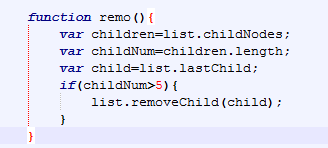
ol的子节点其实有5个,是因为即使文本1,2,3都没有写,仍然有空白的文本存在,

这证明了一句话:“有些东西看不见,并不代表它不存在。”
2017-04-19-02.png

实例4:

js中实现霓虹灯效果

【多练几遍】

思路:

将色码表中的几个数字存进数组中,在js中设置定时器调用方法调用一次后取出数组中的一个颜色,然后计数标志加1,当计数标志等于数组下标的最大值的时候就开始重新设置。实现有序显示颜色。

核心代码:

1
2
3
4
5
6
7
8
9
10
11
12
13
14
15
16
17
18
19
20
21
22
23
24
25
26
27
28
29
30
31
<!DOCTYPE html>

<html>
    <head>
        <title></title>
    </head>
    <body onload="change()">
        <table id="table1" border=10>
            <tr>
                <td>11111111</td>
            </tr>
            <tr>
                <td>22222222222222</td>
            </tr>
        </table>
    </body>
    <script type="text/javascript">
        var i=0;
        var colors=new Array("#0000FF","#99FF00","#660033","#cc66cc","#FFFF33");
        
        function change(){
            if(i>colors.length-1){
                i=0;
            }
            table1.style.borderColor=colors[i];
            i+=1;
            setTimeout("change()",500);
        }
    </script>
    
</html>

实例5:

js实现论坛的评价的添加和删除的效果

思路:

添加删除元素

核心代码:

1
2
3
4
5
6
7
8
9
10
11
12
13
14
15
16
17
18
19
20
21
22
23
24
25
26
27
28
29
30
31
32
33
34
35
36
37
38
39
40
41
42
43
44
45
46
47
48
49
50
51
52
53
54
55
56
57
58
59
60
61
62
63
64
65
66
67
68
69
70
71
72
73
74
75
76
77
78
79
80
81
82
83
84
85
86
87
88
89
90
91
92
93
94
95
96
97
98
99
100
101
102
103
104
105
106
107
108
109
110
111
112
113
114
115
116
117
118
119
120
121
122
123
124
<!DOCTYPE html>

<html>
    <head>
        <title>论坛</title>
        <style>
            textarea {
                width:334px;
                height:100px;
            }
            td {
                background-color:#77FF00;
            }
            .re {
                background-color:#cccccc;
            }
            #reviewer {
                width:336px;
                height:20px;
            }
            #td1 {
                width:100px;
                height:20px;
                background-color:orange;
            }
            #td2 {
                width:320px;
                height:20px;
                background-color:orange;
            }
            #table1 {
                background-color:yellow;
            }
            #div2 {
                width:431px;
                height:200px;
                background-color:gray;
            }
        </style>
    </head>
    
    <body>
    <center>
        <div>
            <img src="socialNetwork.png">
        </div>
        <div>
            <table border="0" id="table1">
                <tr>
                    <td id="td1">评论人</td>
                    <td id="td2">评论内容</td>
                </tr>
            </table>
        </div>
        <p></p>
        <div id="div2">
            <form>
                <table>
                    <tr>
                        <td class="re">评论人:</td>
                        <td class="re"><input type="text" id="reviewer"/></td>
                    </tr>
                    <tr>
                        <td class="re">评论内容:</td>
                        <td class="re"><textarea rows="" cols="" id="review"></textarea></td>
                    </tr>
                    <tr>
                        <td class="re"></td>
                        <td class="re">
                            <input type="button" onclick="add()" value="发表">
                            <input type="reset" onclick="" value="重置">
                            <input type="button" onclick="deleteFirst()" value="删除第一条评论">
                            <input type="button" onclick="deleteLast()" value="删除最后一条评论">
                        </td>
                    </tr>
                </table>
            </form>
        </div>
    </center>
    </body>
    
    <script type="text/javascript">
        var reviewer=document.getElementById("reviewer");
        var review=document.getElementById("review");
        var table1=document.getElementById("table1");
        var flag=0;
        
        function add(){
            flag=flag+1;
            var tr1=document.createElement("tr");
            
            var td1=document.createElement("td");
            var td2=document.createElement("td");
            
            var txt1=document.createTextNode(reviewer.value);
            var txt2=document.createTextNode(review.value);
            
            td1.appendChild(txt1);
            td2.appendChild(txt2);
            
            tr1.appendChild(td1);
            tr1.appendChild(td2);
            
            table1.appendChild(tr1);
            
            reviewer.value="";
            review.value="";
        }
        function deleteFirst(){
            if(flag!=0){
                var children=table1.childNodes;
                table1.removeChild(children[2]);
                flag-=1;
            }
        }
        function deleteLast(){
            if(flag!=0){
                var child=table1.lastChild;
                table1.removeChild(child);
                flag-=1;
            }
        }
    </script>
</html>
 评论
// variables $gt-color-main := #6190e8 $gt-color-sub := #a1a1a1 $gt-color-loader := #999999 $gt-color-error := #ff3860 $gt-color-hr := #e9e9e9 $gt-color-comment-txt := #333333 $gt-color-link-active := #333333 $gt-color-btn := #ffffff $gt-size-base := 16px // default font-size $gt-size-border-radius := 5px $gt-breakpoint-mobile := 479px $gt-mask-z-index := 9999 // functions & mixins clearfix() { &:before &:after { display table clear both content "" } } em($px, $base-size = $gt-size-base) { u = unit($px) if (u is 'px') { unit($px / $base-size, 'em') } else { unit($px, u) } } mobile() { @media (max-width $gt-breakpoint-mobile) { {block} } } // variables - calculated $gt-size-loader-dot := em(6px) $gt-size-loader := em(28px) $gt-size-avatar := em(50px) $gt-size-avatar-mobi := em(32px) // styles // Put everything under container to avoid style conflicts .comments-container { .gt-container { box-sizing border-box * { box-sizing border-box } font-size $gt-size-base // common a { color $gt-color-main &:hover { color lighten($gt-color-main, 20%) border-color lighten($gt-color-main, 20%) } &.is--active { color $gt-color-link-active cursor default !important &:hover { color $gt-color-link-active } } } .hide { display none !important } // icons .gt-svg { display inline-block width em(16px) height em(16px) vertical-align sub svg { width 100% height 100% fill $gt-color-main } } .gt-ico { display inline-block &-text { margin-left em(5px) } &-github { width 100% height 100% .gt-svg { width 100% height 100% } svg { fill inherit } } } // loader .gt-spinner { position relative &::before { position absolute top 3px box-sizing border-box width em(12px) height em(12px) margin-top em(-3px) margin-left em(-6px) border 1px solid $gt-color-btn border-top-color $gt-color-main border-radius 50% animation gt-kf-rotate 0.6s linear infinite content '' } } .gt-loader { position relative display inline-block width $gt-size-loader height $gt-size-loader font-style normal // font-size: $gt-size-loader line-height $gt-size-loader border 1px solid $gt-color-loader border-radius 50% animation ease gt-kf-rotate 1.5s infinite &:before { position absolute top 0 left 50% display block width $gt-size-loader-dot height $gt-size-loader-dot margin-top -($gt-size-loader-dot / 2) margin-left -($gt-size-loader-dot / 2) background-color $gt-color-loader border-radius 50% content '' } } // avatar .gt-avatar { display inline-block width $gt-size-avatar height $gt-size-avatar +mobile() { width $gt-size-avatar-mobi height $gt-size-avatar-mobi } img { width 100% height auto border-radius 3px } &-github { width $gt-size-avatar - em(2px) height $gt-size-avatar - em(2px) cursor pointer +mobile() { width $gt-size-avatar-mobi - em(2px) height $gt-size-avatar-mobi - em(2px) } } } // button .gt-btn { display inline-block padding em(12px) em(20px) color $gt-color-btn font-size em(12px) line-height 1 white-space nowrap text-decoration none background-color $gt-color-main border 1px solid $gt-color-main border-radius $gt-size-border-radius outline none cursor pointer &-text { font-weight 400 } &-loading { position relative display inline-block width em(12px) height em(16px) margin-left em(8px) vertical-align top } &.is--disable { cursor not-allowed opacity 0.5 } &-login { margin-right 0 } &-preview { color $gt-color-main background-color var(--background-color) &:hover { background-color var(--second-background-color) } } &-public { &:hover { background-color lighten($gt-color-main, 20%) border-color lighten($gt-color-main, 20%) } } } } &-loadmore // loadmore /* error */ .gt-error { margin em(10px) color $gt-color-error text-align center } // initing .gt-initing { padding em(20px) 0 text-align center &-text { margin em(10px) auto font-size 92% } } // no int .gt-no-init { padding em(20px) 0 text-align center } // link .gt-link { border-bottom 1px dotted $gt-color-main &-counts &-project { text-decoration none } } // meta .gt-meta { position relative z-index 10 margin em(20px) 0 padding em(16px) 0 font-size em(16px) border-bottom 1px solid $gt-color-hr clearfix() } .gt-counts { margin 0 em(10px) 0 0 color var(--default-text-color) } .gt-user { float right margin 0 font-size 92% &-pic { width 16px height 16px margin-right em(8px) vertical-align top } &-inner { display inline-block cursor pointer .gt-user-name { color var(--default-text-color) } } .gt-ico { margin 0 0 0 em(5px) svg { fill var(--default-text-color) } } .is--poping { .gt-ico { svg { fill $gt-color-main } } } } .gt-version { margin-left em(6px) color $gt-color-sub } .gt-copyright { margin 0 em(15px) em(8px) padding-top em(8px) border-top 1px solid var(--border-color) } // popup .gt-popup { position absolute top em(38px) right 0 display inline-block padding em(10px) 0 font-size em(14px) letter-spacing 0.5px background var(--background-color) border 1px solid var(--border-color) .gt-action { position relative display block margin em(8px) 0 padding 0 em(18px) text-decoration none cursor pointer &.is--active { &:before { position absolute top em(7px) left em(8px) width em(4px) height em(4px) background $gt-color-main content '' } } } } // header .gt-header { position relative display flex &-comment { flex 1 margin-left em(20px) +mobile() { margin-left em(14px) } } &-textarea { display block box-sizing border-box width 100% min-height em(82px) max-height em(240px) padding em(12px) color var(--default-text-color) font-size em(14px) word-wrap break-word background-color var(--fourth-text-color) border 1px solid var(--border-color) border-radius $gt-size-border-radius outline none transition all 0.25s ease resize vertical &:hover { background-color var(--background-color) } } &-preview { padding em(12px) background-color var(--background-color) border 1px solid var(--border-color) border-radius $gt-size-border-radius } &-controls { position relative margin em(12px) 0 0 clearfix() +mobile() { margin 0 } &-tip { color $gt-color-main font-size em(14px) text-decoration none vertical-align sub +mobile() { display none } } .gt-btn { float right margin-left em(20px) +mobile() { float none width 100% margin em(12px) 0 0 } } } } &:after { position fixed top 0 right 0 bottom 100% left 0 opacity 0 content '' } &.gt-input-focused { position relative &:after { position fixed top 0 right 0 bottom 0 left 0 z-index $gt-mask-z-index background #000 opacity 0.6 transition opacity 0.3s, bottom 0s content '' } .gt-header-comment { z-index $gt-mask-z-index + 1 } } // comments .gt-comments { padding-top em(20px) &-null { text-align center } &-controls { margin em(20px) 0 text-align center } } // comment .gt-comment { position relative display flex padding em(10px) 0 &-content { flex 1 margin-left em(20px) padding em(12px) em(16px) overflow auto background-color var(--second-background-color) transition all ease 0.25s +mobile() { margin-left em(14px) padding em(10px) em(12px) } } &-header { position relative margin-bottom em(8px) font-size em(14px) } &-block-1 { float right width em(32px) height em(22px) } &-block-2 { float right width em(64px) height em(22px) } &-username { color $gt-color-main font-weight 500 text-decoration none &:hover { text-decoration underline } } &-text { margin-left em(8px) color $gt-color-sub } &-date { margin-left em(8px) color $gt-color-sub } &-like &-edit &-reply { position absolute height em(22px) &:hover { cursor pointer } } &-like { top 0 right em(32px) } &-edit &-reply { top 0 right 0 } &-body { // color: $gt-color-comment-txt !important color var(--second-text-color) !important .email-hidden-toggle a { display inline-block height 12px padding 0 9px color #444d56 font-weight 600 font-size 12px line-height 6px text-decoration none vertical-align middle background #dfe2e5 border-radius 1px &:hover { background-color #c6cbd1 } } .email-hidden-reply { display none white-space pre-wrap .email-signature-reply { margin 15px 0 padding 0 15px color #586069 border-left 4px solid #dfe2e5 } } .email-hidden-reply.expanded { display block } } &-admin { .gt-comment-content { background-color var(--fourth-text-color) } } } @keyframes gt-kf-rotate { 0% { transform rotate(0) } 100% { transform rotate(360deg) } } }