
GitLab之CI_CD配置
Xplorist Lv6

GitLab之CI_CD配置

wiki信息

  • 创建时间: 2020-12-17
  • 最近修改时间: 2020-12-17
  • 当前版本:v1.0.1
  • wiki作者: 向波任(C3005579)
  • 联系电话: 5073+66948
  • 联系邮箱:mcebg-mac1-miscdsys2@mail.foxconn.com

本地测试成功的流程步骤(Win10开发机上架设虚拟机)

  1. 安装VirtualBox虚拟机,并在虚拟机中安装CentOS 7操作系统
  2. 设置VirtualBox虚拟机中的CentOS 7的网络为桥接模式,并配置CentOS7中的内网代理
  3. CentOS中安装GitLab,设置配置文件,并启动
  4. Win10中安装GitLab-Runner,并和GitLab进行交互式注册
  5. Tomcat配置只有manager-script角色的用户
  6. 创建Maven项目并在项目根目录下创建.gtilab-ci.yml,并针对该项目进行配置PowerShell脚本
  7. GitLab中创建项目,开发者push项目源码到GitLab中,Windows服务器的GitLab-Runner自动部署项目到Tomcat

生产环境流程步骤(基于物理机环境,非Docker容器)

  1. 准备三台电脑:1台GitLab服务器(CentOS 7),1台Tomcat服务器(Windows 10), 1台开发者电脑
  2. GitLab服务器环境配置
    1. 安装VirtualBox (如果服务器是Windows操作系统才安装)
    2. 安装CentOS7, 设置静态IP, 配置内网代理(如果是在VirtualBox中,需要设置为桥接模式)
    3. 安装GitLab, 配置IP,并启动
  3. Tomcat服务器环境配置
    1. 安装JDK1.8,并配置环境变量
    2. 安装Maven,并配置环境变量,配置内网代理
    3. 安装Tomcat,并配置manager-script角色的用户,conf/Catalina/localhost/中创建并配置manager.xml
    4. 安装GitLab-Runner,并和GitLab进行交互式注册
  4. 开发者电脑环境配置
    1. 安装JDK1.8,并配置环境变量
    2. 安装Maven,并配置环境变量,配置内网代理
    3. 安装Git
    4. 创建基于Maven结构的JavaWeb项目(例如:SpringBoot项目),并在项目中创建.gitlab-ci.yml,将相应的Maven打包命令和PowerShell脚本写入其中
    5. 使用Git将项目代码push到GitLab上去,Tomcat服务器上的GitLab-Runner就自动执行构建项目并部署到Tomcat中去了

具体操作

安装VirtualBox

  • 下载VirtualBox,网址:Download VirtualBox
  • 将下载好的VirtualBox安装在指定文件夹下

安装CentOS7

  • 下载CentOS7,网址:CentOS Linux 直接下载网址:CentOS-7-x86_64-Everything-2009.iso
  • VirtualBox下安装CentOS7
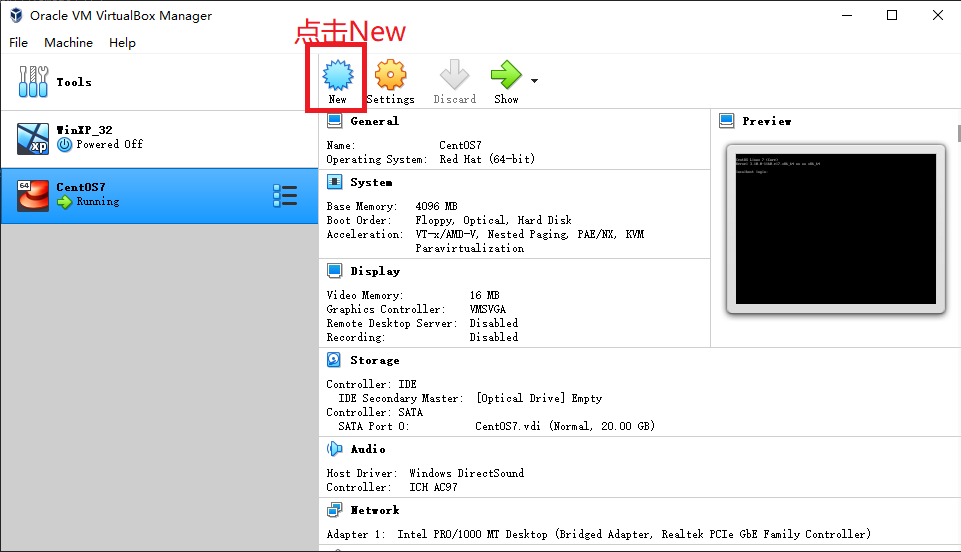
    • 点击New

      1.点击New.png

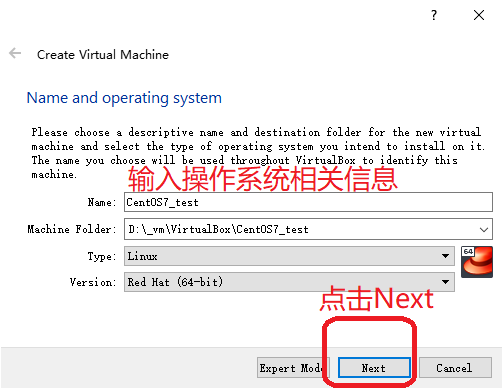
    • 输入操作系统相关信息,并点击Next

      2.输入操作系统相关信息.png

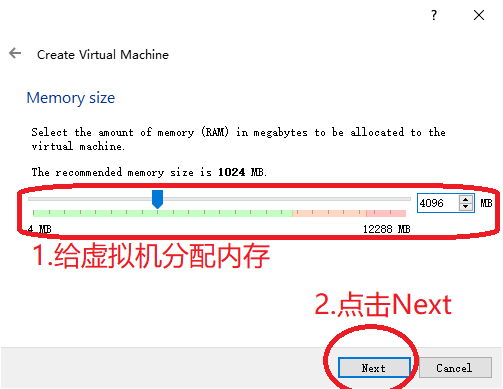
    • 给虚拟机分配内存

      3.给虚拟机分配内存.png

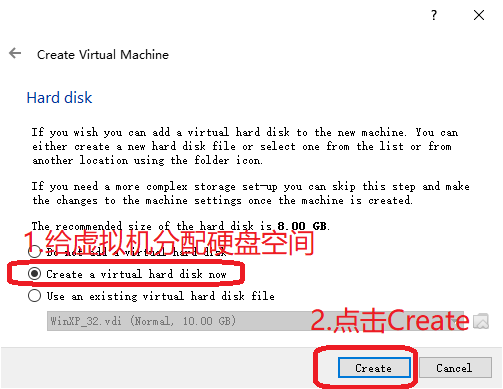
    • 给虚拟机分配硬盘空间

      4.给虚拟机分配硬盘空间.png

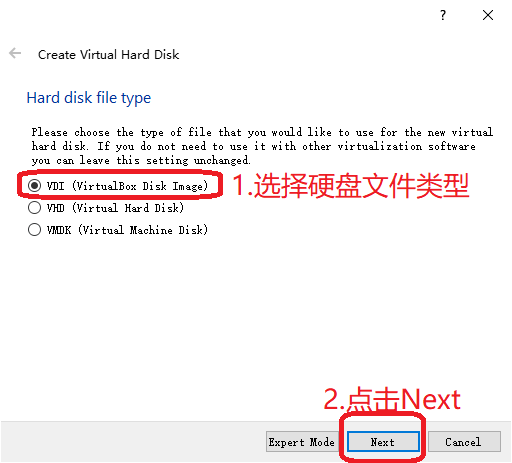
    • 选择硬盘文件类型

      5.选择硬盘文件类型.png

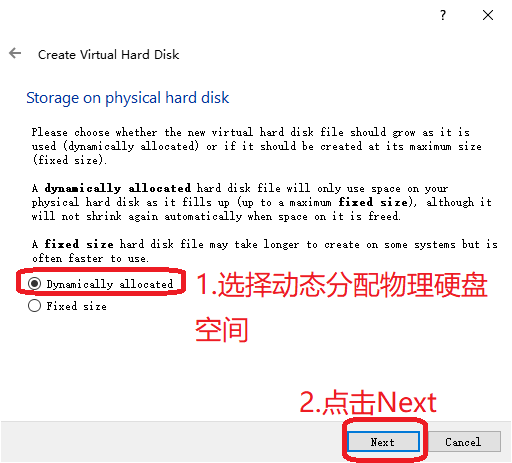
    • 选择动态分配物理硬盘空间

      6.选择动态分配物理硬盘空间.png

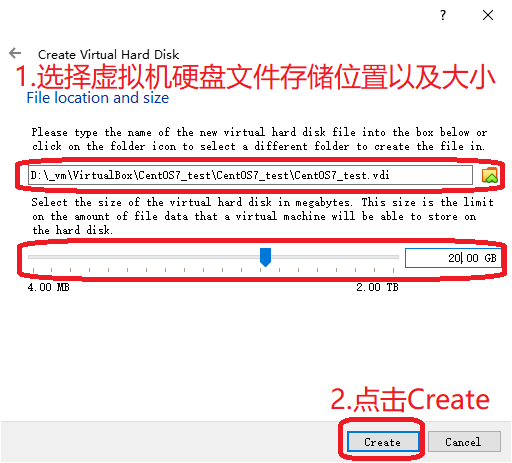
    • 选择虚拟机硬盘文件存储位置以及大小

      7.选择虚拟机硬盘文件存储位置以及大小.png

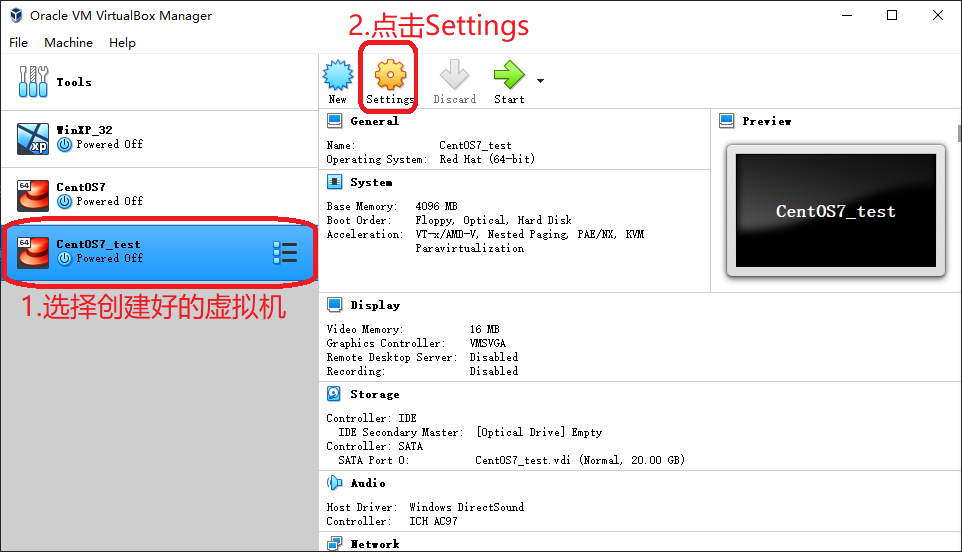
    • 选择创建好的虚拟机

      8.选择创建好的虚拟机.png

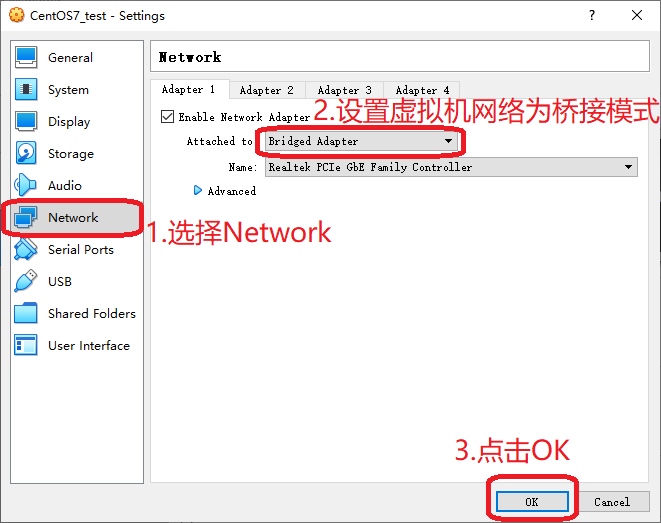
    • 设置虚拟机网络为桥接模式

      9.设置虚拟机网络为桥接模式.png

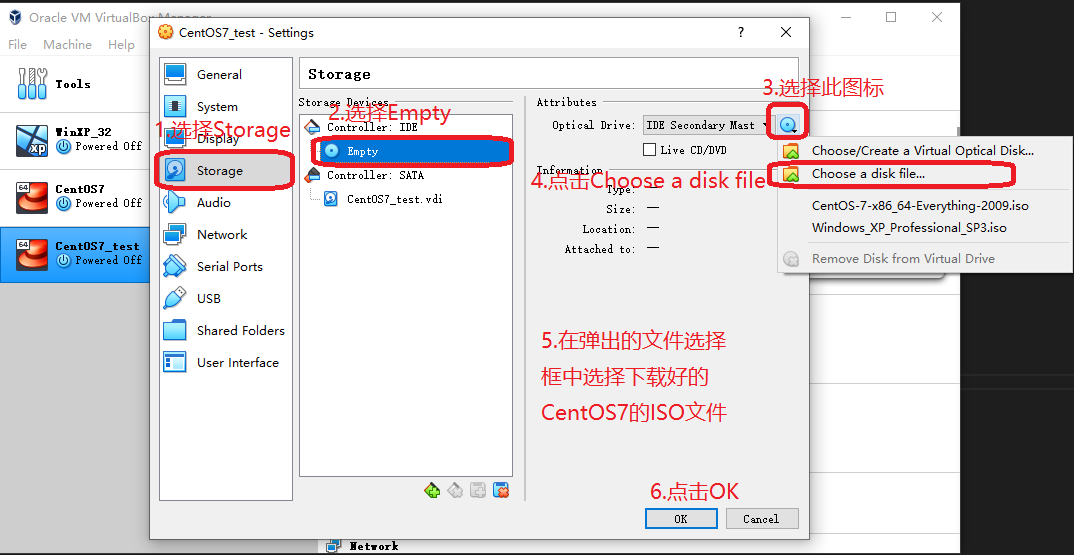
    • 设置系统启动盘用来安装操作系统的ISO文件
      10.设置系统启动盘用来安装操作系统的ISO文件.png

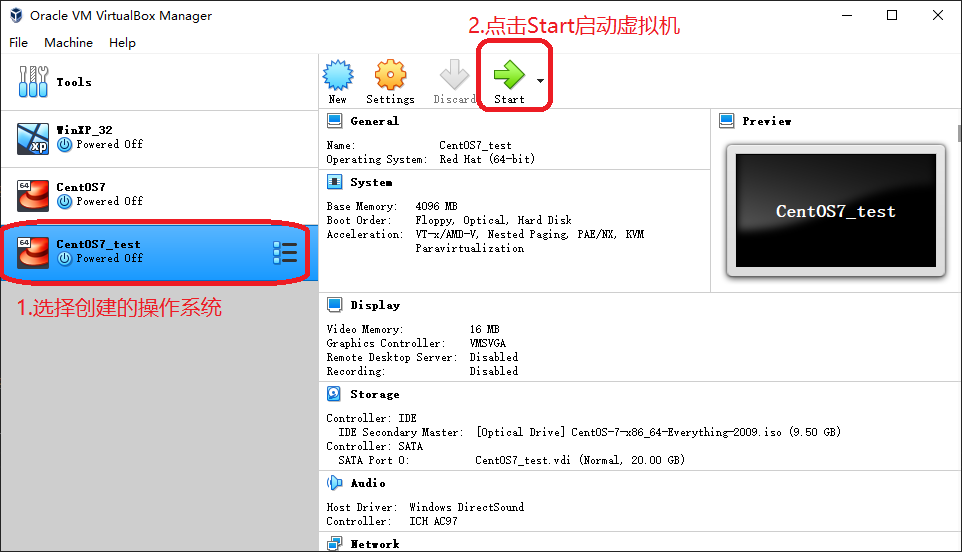
    • 点击Start启动虚拟机

      11.点击Start启动虚拟机.png

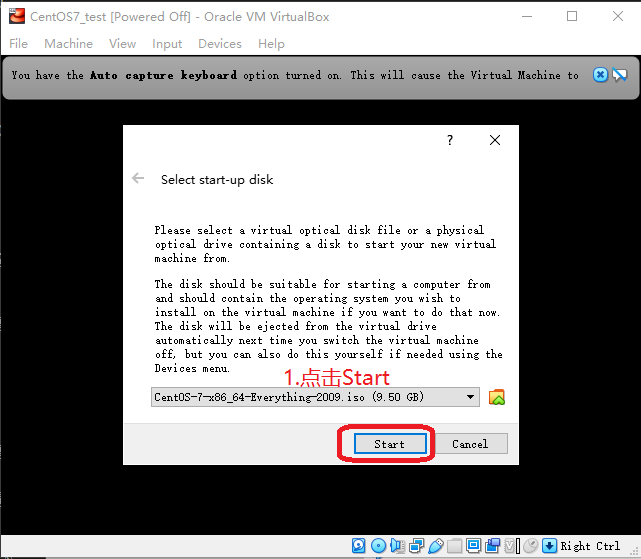
    • 点击Start

      12.点击Start.png

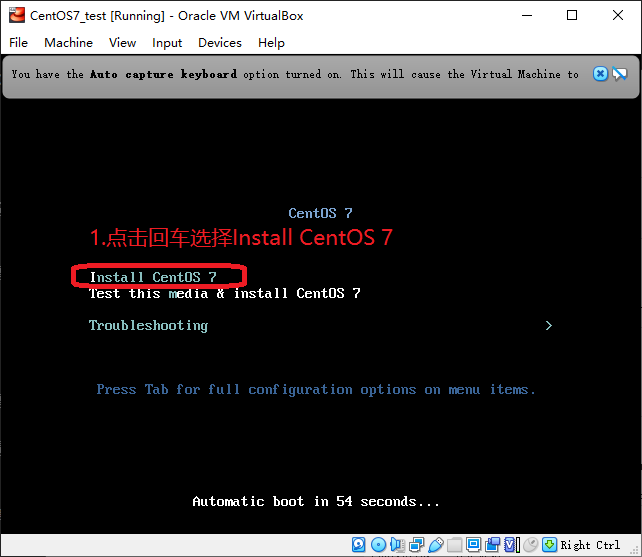
    • 选择安装CentOS7

      13.选择安装CentOS7.png

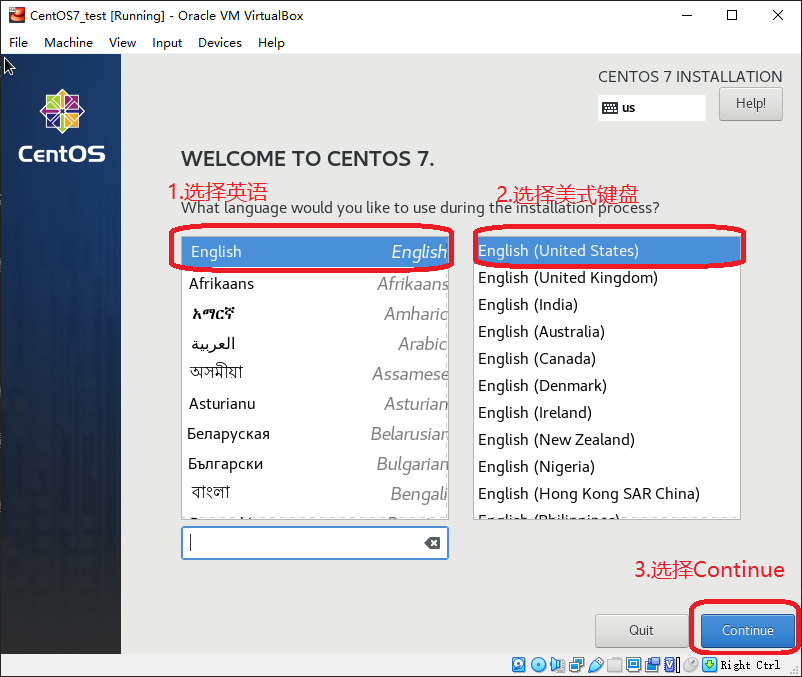
    • 选择英语和美式键盘

      14.选择英语和美式键盘.png

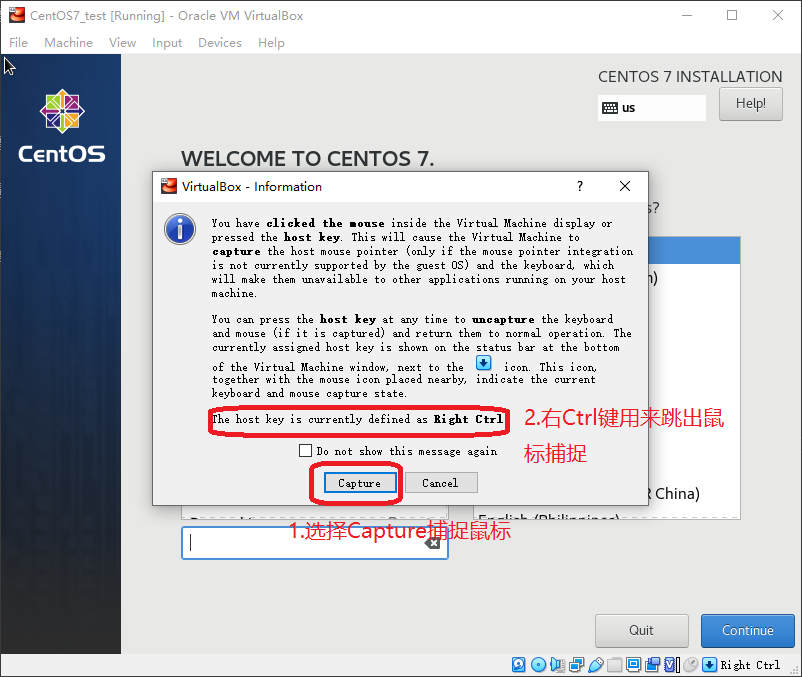
    • 选择Capture捕捉鼠标

      15.选择Capture捕捉鼠标.png

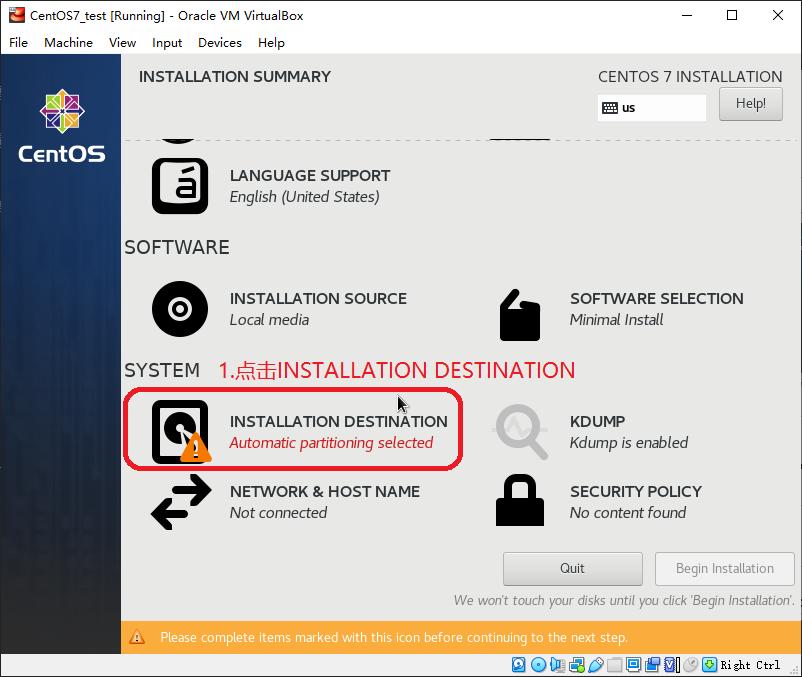
    • 点击CentOS7的安装位置

      16.点击CentOS7的安装位置.png

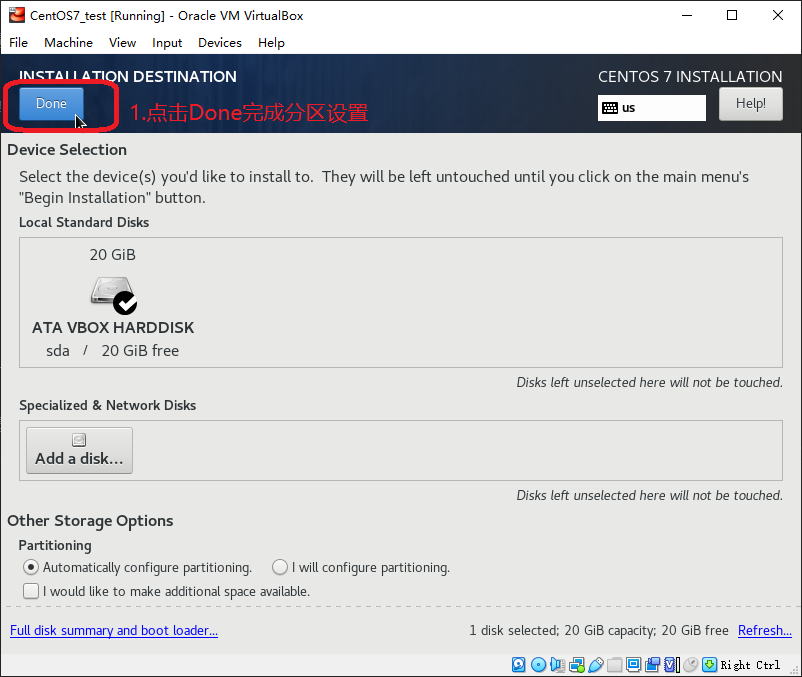
    • 点击Done完成分区设置

      17.点击Done完成分区设置.png

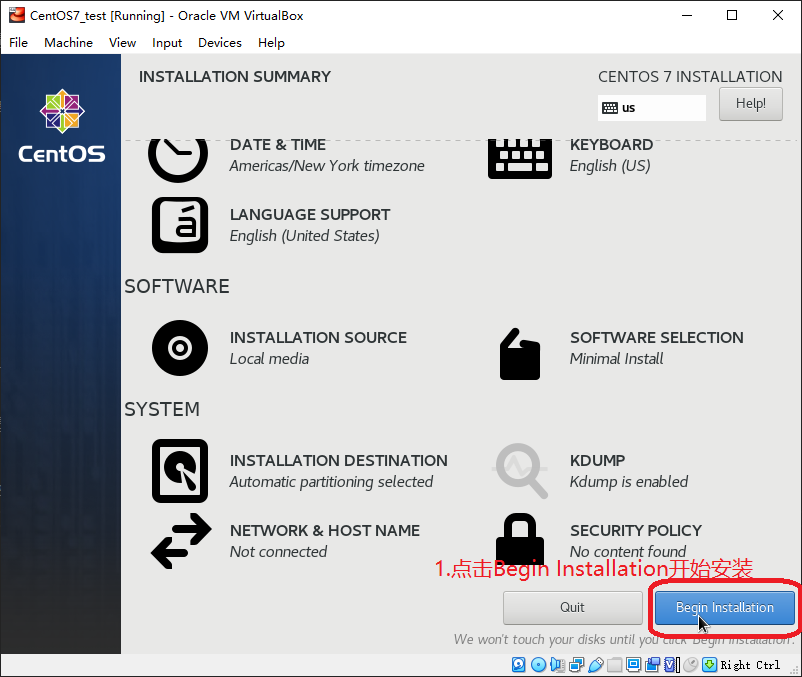
    • 点击BeginInstallation开始安装

      18.点击BeginInstallation开始安装.png

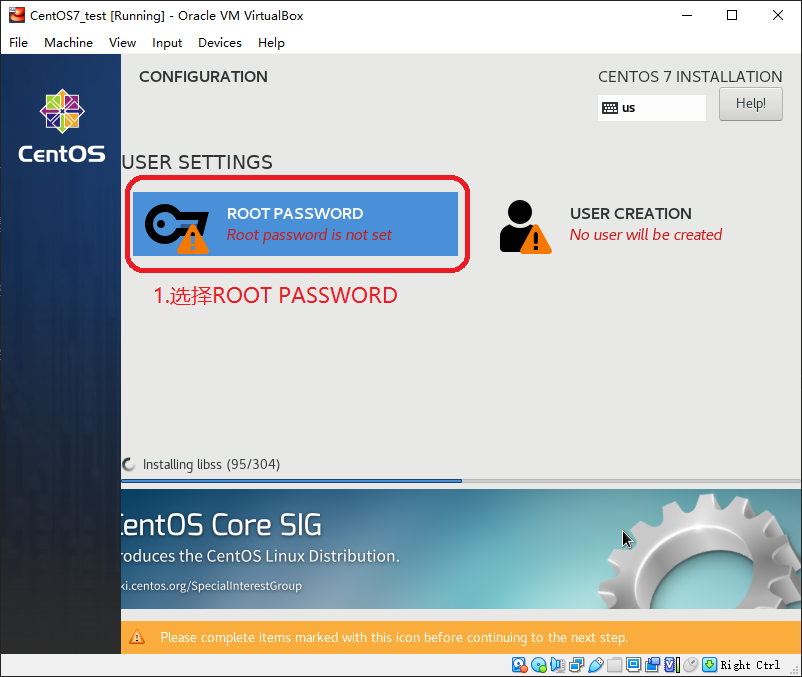
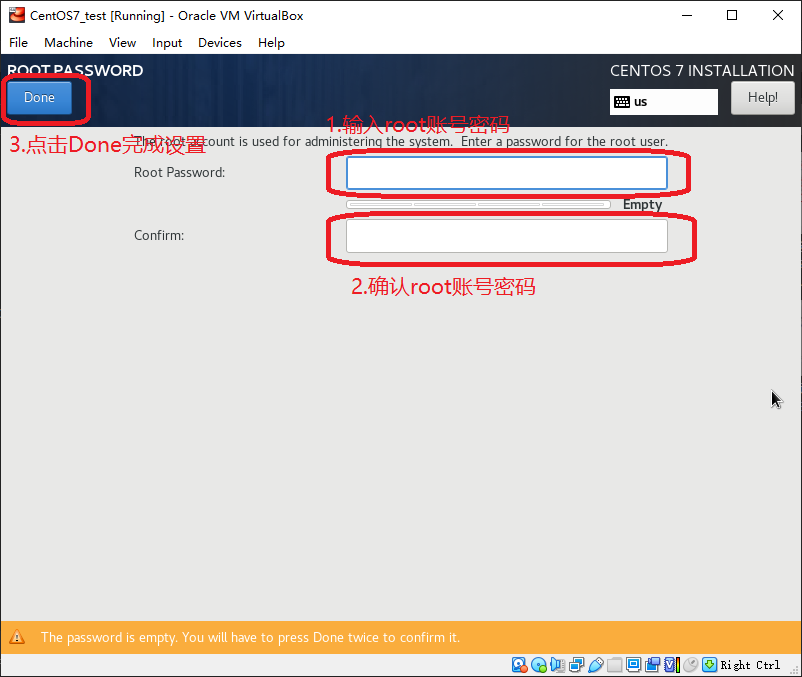
    • 设置root账号密码

      19.选择设置root用户密码.png

      20.设置root用户密码.png

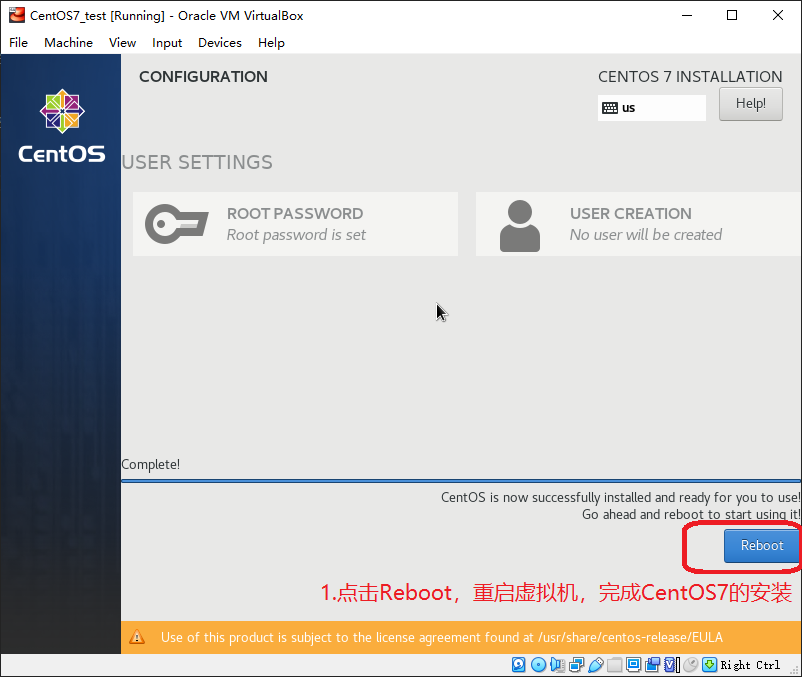
    • 点击Reboot重启虚拟机,完成CentOS7的安装

      21.点击Reboot重启虚拟机,完成CentOS7的安装.png

设置CentOS7

配置静态IP

  • 虚拟机重启后,用root账号登录

  • 设置静态IP,bash命令如下

    1
    2
    3
    $ cd /etc/sysconfig/network-scripts
    $ ls
    $ vi ifcfg-enp0s3

    进入vi后,点击i键进入Insert模式,修改ifcfg-enp0s3中的内容如下:

    1
    2
    3
    4
    5
    6
    7
    BOOTPROTO=static # 将默认的dhcp改为static
    ONBOOT=yes # 将默认的no改为yes

    # 以下是新增的内容
    IPADDR=10.244.186.85
    NETMASK=255.255.255.0
    GATEWAY=10.244.186.1

    修改完成后,点击Esc推出Insert模式,然后输入 :wq 用来退出vi

    重置网络配置

    1
    $ service network restart

    查看网络配置

    1
    $ ip addr

    CentOS7的静态IP配置完成

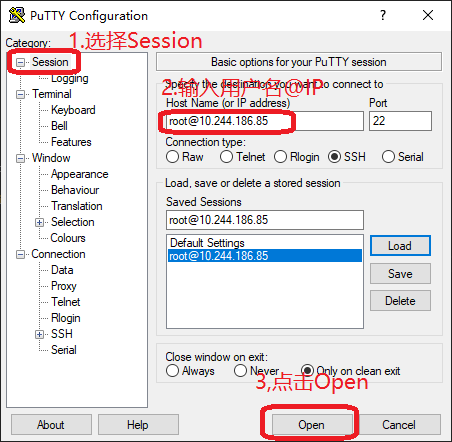
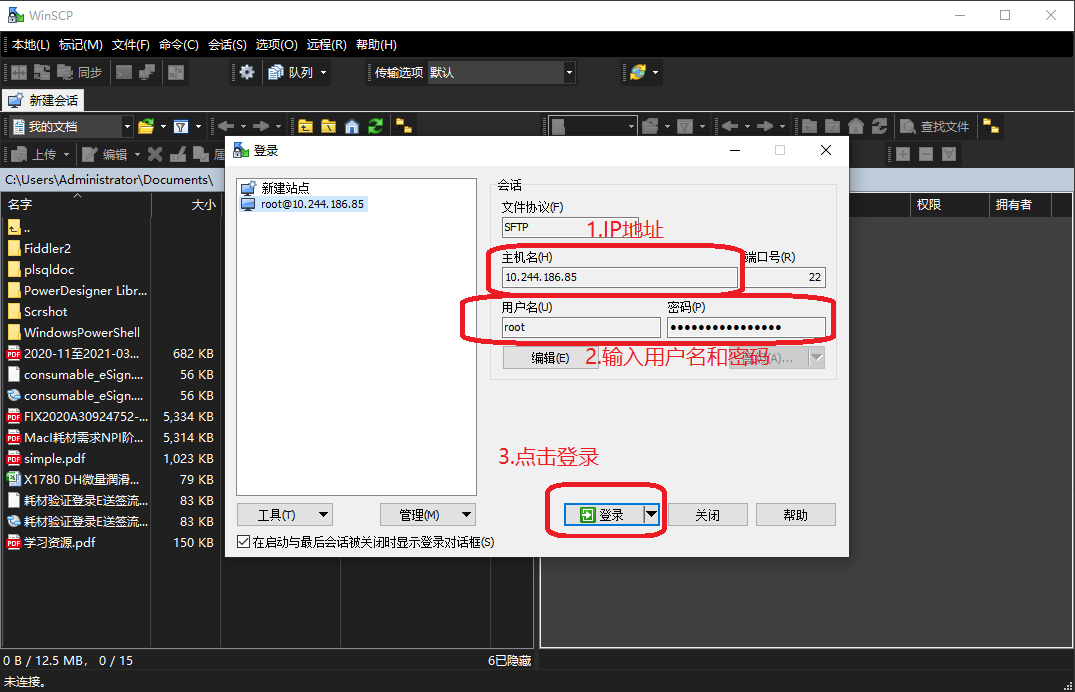
安装远程连接工具

设置网络代理

  • profile设置代理

编辑/etc/profile

1
$ vi /etc/profile

profile中添加以下信息

1
2
http_proxy=http://10.244.186.81:8088/
export http_proxy

生效配置

1
$ source /etc/profile
  • yum设置代理

编辑/etc/yum.conf

1
$ vi /etc/yum.conf

yum.conf中添加以下信息

1
proxy=http://10.244.186.81:8088/

编辑/root/.bashrc

1
$ vi /root/.bashrc

.bashrc中添加以下信息

1
export http_proxy="http://10.244.186.81:8088/"
  • wget设置代理

编辑/etc/wgetrc

1
$ vi /etc/wgetrc

wgetrc中添加以下信息

1
http_proxy=http://10.244.186.81:8088/
  • 重启服务器
1
$ reboot

安装GitLab

  • 查看CentOS 版本信息
1
$ cat /etc/centos-release
  • 查看IP地址
1
ip addr
  • 安装依赖
1
$ yum install curl policycoreutils-python openssh-server deltarpm -y
  • 查看防火墙放行列表
1
$ firewall-cmd --list-all
  • 防火墙放行80,443端口
1
2
$ firewall-cmd --zone=public --add-port=80/tcp --permanent
$ firewall-cmd --zone=public --add-port=443/tcp --permanent
  • 重启防火墙
1
$ firewall-cmd --reload
1
2
3
4
5
[gitlab-ce]
name=Gitlab CE Repository
baseurl=http://mirrors.tuna.tsinghua.edu.cn/gitlab-ce/yum/el$releasever/
gpgcheck=0
enabled=1
  • 添加命令
1
$ vi /etc/yum.repos.d/gitlab-ce.repo
  • 查找yum源中gitlab-ce的版本
1
$ yum list gitlab-ce --showduplicates|tail -n 30|head
  • 选择安装版本(2020-12-17当前最新版本为13.3.7-ce.0.el7)
1
$ yum install gitlab-ce-13.3.7 -y
  • 查看Gitlab版本
1
$ cat /opt/gitlab/embedded/service/gitlab-rails/VERSION
  • 配置GitLab配置文件/etc/gitlab/gitlab.rb
1
$ vi /ect/gitlab/gitlab.rb

修改以下内容

1
2
# 将原来的 external_url 'http://gitlab.example.com' 修改为以下内容
external_url 'http://10.244.186.85'
  • 加载Gitlab的配置
1
$ gitlab-ctl reconfigure

当最后出现 gitlab Reconfigured 表明配置成功

  • 启动Gitlab
1
2
$ systemctl start gitlab-runsvdir
$ gitlab-ctl start
  • 访问 http://10.244.186.85 提示输入密码, 这里输入的是root账号的密码,切记不要乱输,不然就只有通过修改数据库的数据来修改root账号的密码了

  • 注册一个非root账号登录,用来创建项目

安装JDK1.8

  • 过程略

安装Maven

  • 过程略

安装Tomcat

  • 安装过程略

  • 在conf/Catalina/localhost/文件夹下创建manager.xml,内容如下

1
2
3
4
5
<?xml version="1.0" encoding="UTF-8"?>
<Context privileged="true" antiResourceLocking="false"
docBase="${catalina.home}/webapps/manager">
<Valve className="org.apache.catalina.valves.RemoteAddrValve" allow="^.*$" />
</Context>
  • 配置manager-script角色的用户,在conf/tomcat-users.xml中添加以下内容:
1
2
<role rolename="manager-script"/>
<user username="scriptManager" password="scriptManager" roles="manager-script"/>

安装GitLab-Runner

1
$ ./gitlab-runner.exe register
  • 交互式注册如下
1
2
3
4
5
6
7
8
9
10
11
12
13
14
15
16
17
18
19
20
1.Enter the GitLab instance URL (for example, https://gitlab.com/):
# 输入gitlab的网址
http://10.244.186.85/

2. Enter the registration token:
# 登录root账号进入http://10.244.186.85/admin/runners,找到shared Runner的token并输入(这里以Shared Runner为例)
VRBZQhtZwSr8EpfN1wge

3.Enter a description for the runner:
# 输入此runner的描述
86_win10_shared

4.Enter tags for the runner (comma-separated):
# 输入此Runner的tags
86_win10_shared

5.Enter an executor: parallels, ssh, virtualbox, kubernetes, docker-windows, docker, docker-ssh, shell, docker+machine, docker-ssh+machine, custom:
# 输入executor的类型,选择shell, (Windows操作系统下的有效shell为PowerShell)
shell

  • 安装gitlab-runner
1
$ ./gitlab-runner.exe install
  • 启动gitlab-runner,到此gitlab-runner就安装启动成功了
1
$ ./gitlab-runner.exe start
  • 停止gitlab-runner(当需要停止时才使用)
1
$ ./gitlab-runner.exe stop
  • 卸载gitlab-runner(当需要卸载时才使用)
1
$ ./gitlab-runner.exe uninstall

安装Git

  • 过程略

创建SpringBoot项目

  • 过程略

  • 项目中添加.gitlab-ci.yml文件,内容如下:

1
2
3
4
5
6
7
8
9
10
11
12
13
14
15
16
17
18
19
20
21
22
build1:
stage: build
script:
# maven打包
- mvn clean package
# 以下为PowerShell中的相关文件操作命令,主要是先删除tomcat中的war包和项目文件夹,然后把打包好的war包复制到tomcat的webapps文件夹下
- new-item -path D:\_dev_env\apache-tomcat-8.5.59\webapps\portal.war -itemtype file -force
- remove-item -path D:\_dev_env\apache-tomcat-8.5.59\webapps\portal.war
- new-item -path D:\_dev_env\apache-tomcat-8.5.59\webapps\portal -itemtype directory -force
- remove-item -path D:\_dev_env\apache-tomcat-8.5.59\webapps\portal -recurse
- copy-item -path ./target/portal.war -destination D:\_dev_env\apache-tomcat-8.5.59\webapps -force
after_script:
# http://localhost:8080/manager/text/reload?path=/portal 这个uri为该项目在tomcat中的reload地址,portal是项目名,注意修改为自己的项目名
# scriptManager:scriptManager 为tomcat中配置的manager-script角色的用户scriptManager账号和密码
# invoke-webrequest是PowerShell中的url请求命令,类似与Linux bash中curl命令,整行命令的作用:请求该项目重启的url从而使整个项目重启,作用类似与在html中点击该项目的重载按钮
- invoke-webrequest -Uri 'http://localhost:8080/manager/text/reload?path=/portal' -Headers @{ Authorization = "Basic " + [System.Convert]::ToBase64String([System.Text.Encoding]::ASCII.GetBytes("scriptManager:scriptManager")) }
tags:
# 这里的tags是之前在gitlab-runner交互式注册时填写的tags
- 86_win10_shared
only:
# 这里的master指的是git代码仓库中的master分支的代码变动才触发gitlab-runner
- master

使用Git将代码push到GitLab

  • 过程略
 评论
// variables $gt-color-main := #6190e8 $gt-color-sub := #a1a1a1 $gt-color-loader := #999999 $gt-color-error := #ff3860 $gt-color-hr := #e9e9e9 $gt-color-comment-txt := #333333 $gt-color-link-active := #333333 $gt-color-btn := #ffffff $gt-size-base := 16px // default font-size $gt-size-border-radius := 5px $gt-breakpoint-mobile := 479px $gt-mask-z-index := 9999 // functions & mixins clearfix() { &:before &:after { display table clear both content "" } } em($px, $base-size = $gt-size-base) { u = unit($px) if (u is 'px') { unit($px / $base-size, 'em') } else { unit($px, u) } } mobile() { @media (max-width $gt-breakpoint-mobile) { {block} } } // variables - calculated $gt-size-loader-dot := em(6px) $gt-size-loader := em(28px) $gt-size-avatar := em(50px) $gt-size-avatar-mobi := em(32px) // styles // Put everything under container to avoid style conflicts .comments-container { .gt-container { box-sizing border-box * { box-sizing border-box } font-size $gt-size-base // common a { color $gt-color-main &:hover { color lighten($gt-color-main, 20%) border-color lighten($gt-color-main, 20%) } &.is--active { color $gt-color-link-active cursor default !important &:hover { color $gt-color-link-active } } } .hide { display none !important } // icons .gt-svg { display inline-block width em(16px) height em(16px) vertical-align sub svg { width 100% height 100% fill $gt-color-main } } .gt-ico { display inline-block &-text { margin-left em(5px) } &-github { width 100% height 100% .gt-svg { width 100% height 100% } svg { fill inherit } } } // loader .gt-spinner { position relative &::before { position absolute top 3px box-sizing border-box width em(12px) height em(12px) margin-top em(-3px) margin-left em(-6px) border 1px solid $gt-color-btn border-top-color $gt-color-main border-radius 50% animation gt-kf-rotate 0.6s linear infinite content '' } } .gt-loader { position relative display inline-block width $gt-size-loader height $gt-size-loader font-style normal // font-size: $gt-size-loader line-height $gt-size-loader border 1px solid $gt-color-loader border-radius 50% animation ease gt-kf-rotate 1.5s infinite &:before { position absolute top 0 left 50% display block width $gt-size-loader-dot height $gt-size-loader-dot margin-top -($gt-size-loader-dot / 2) margin-left -($gt-size-loader-dot / 2) background-color $gt-color-loader border-radius 50% content '' } } // avatar .gt-avatar { display inline-block width $gt-size-avatar height $gt-size-avatar +mobile() { width $gt-size-avatar-mobi height $gt-size-avatar-mobi } img { width 100% height auto border-radius 3px } &-github { width $gt-size-avatar - em(2px) height $gt-size-avatar - em(2px) cursor pointer +mobile() { width $gt-size-avatar-mobi - em(2px) height $gt-size-avatar-mobi - em(2px) } } } // button .gt-btn { display inline-block padding em(12px) em(20px) color $gt-color-btn font-size em(12px) line-height 1 white-space nowrap text-decoration none background-color $gt-color-main border 1px solid $gt-color-main border-radius $gt-size-border-radius outline none cursor pointer &-text { font-weight 400 } &-loading { position relative display inline-block width em(12px) height em(16px) margin-left em(8px) vertical-align top } &.is--disable { cursor not-allowed opacity 0.5 } &-login { margin-right 0 } &-preview { color $gt-color-main background-color var(--background-color) &:hover { background-color var(--second-background-color) } } &-public { &:hover { background-color lighten($gt-color-main, 20%) border-color lighten($gt-color-main, 20%) } } } } &-loadmore // loadmore /* error */ .gt-error { margin em(10px) color $gt-color-error text-align center } // initing .gt-initing { padding em(20px) 0 text-align center &-text { margin em(10px) auto font-size 92% } } // no int .gt-no-init { padding em(20px) 0 text-align center } // link .gt-link { border-bottom 1px dotted $gt-color-main &-counts &-project { text-decoration none } } // meta .gt-meta { position relative z-index 10 margin em(20px) 0 padding em(16px) 0 font-size em(16px) border-bottom 1px solid $gt-color-hr clearfix() } .gt-counts { margin 0 em(10px) 0 0 color var(--default-text-color) } .gt-user { float right margin 0 font-size 92% &-pic { width 16px height 16px margin-right em(8px) vertical-align top } &-inner { display inline-block cursor pointer .gt-user-name { color var(--default-text-color) } } .gt-ico { margin 0 0 0 em(5px) svg { fill var(--default-text-color) } } .is--poping { .gt-ico { svg { fill $gt-color-main } } } } .gt-version { margin-left em(6px) color $gt-color-sub } .gt-copyright { margin 0 em(15px) em(8px) padding-top em(8px) border-top 1px solid var(--border-color) } // popup .gt-popup { position absolute top em(38px) right 0 display inline-block padding em(10px) 0 font-size em(14px) letter-spacing 0.5px background var(--background-color) border 1px solid var(--border-color) .gt-action { position relative display block margin em(8px) 0 padding 0 em(18px) text-decoration none cursor pointer &.is--active { &:before { position absolute top em(7px) left em(8px) width em(4px) height em(4px) background $gt-color-main content '' } } } } // header .gt-header { position relative display flex &-comment { flex 1 margin-left em(20px) +mobile() { margin-left em(14px) } } &-textarea { display block box-sizing border-box width 100% min-height em(82px) max-height em(240px) padding em(12px) color var(--default-text-color) font-size em(14px) word-wrap break-word background-color var(--fourth-text-color) border 1px solid var(--border-color) border-radius $gt-size-border-radius outline none transition all 0.25s ease resize vertical &:hover { background-color var(--background-color) } } &-preview { padding em(12px) background-color var(--background-color) border 1px solid var(--border-color) border-radius $gt-size-border-radius } &-controls { position relative margin em(12px) 0 0 clearfix() +mobile() { margin 0 } &-tip { color $gt-color-main font-size em(14px) text-decoration none vertical-align sub +mobile() { display none } } .gt-btn { float right margin-left em(20px) +mobile() { float none width 100% margin em(12px) 0 0 } } } } &:after { position fixed top 0 right 0 bottom 100% left 0 opacity 0 content '' } &.gt-input-focused { position relative &:after { position fixed top 0 right 0 bottom 0 left 0 z-index $gt-mask-z-index background #000 opacity 0.6 transition opacity 0.3s, bottom 0s content '' } .gt-header-comment { z-index $gt-mask-z-index + 1 } } // comments .gt-comments { padding-top em(20px) &-null { text-align center } &-controls { margin em(20px) 0 text-align center } } // comment .gt-comment { position relative display flex padding em(10px) 0 &-content { flex 1 margin-left em(20px) padding em(12px) em(16px) overflow auto background-color var(--second-background-color) transition all ease 0.25s +mobile() { margin-left em(14px) padding em(10px) em(12px) } } &-header { position relative margin-bottom em(8px) font-size em(14px) } &-block-1 { float right width em(32px) height em(22px) } &-block-2 { float right width em(64px) height em(22px) } &-username { color $gt-color-main font-weight 500 text-decoration none &:hover { text-decoration underline } } &-text { margin-left em(8px) color $gt-color-sub } &-date { margin-left em(8px) color $gt-color-sub } &-like &-edit &-reply { position absolute height em(22px) &:hover { cursor pointer } } &-like { top 0 right em(32px) } &-edit &-reply { top 0 right 0 } &-body { // color: $gt-color-comment-txt !important color var(--second-text-color) !important .email-hidden-toggle a { display inline-block height 12px padding 0 9px color #444d56 font-weight 600 font-size 12px line-height 6px text-decoration none vertical-align middle background #dfe2e5 border-radius 1px &:hover { background-color #c6cbd1 } } .email-hidden-reply { display none white-space pre-wrap .email-signature-reply { margin 15px 0 padding 0 15px color #586069 border-left 4px solid #dfe2e5 } } .email-hidden-reply.expanded { display block } } &-admin { .gt-comment-content { background-color var(--fourth-text-color) } } } @keyframes gt-kf-rotate { 0% { transform rotate(0) } 100% { transform rotate(360deg) } } }